Openbyte
Get in Touch →

info@openbyte.co.za
0860 222 111

STABLE • OPEN SOURCE • ICT SOLUTIONS

Linux
Containers

Containerisation is a modern, lightweight approach to hosting services — more efficient than traditional virtualisation.

Linux Containers

Containerisation is a modern, lightweight approach to hosting services — more efficient than traditional virtualisation. A single server can run hundreds of containers with minimal overhead. We deploy Docker on Linux servers and integrate with cloud infrastructure for South African businesses in Johannesburg and Cape Town.

Fast startup

Containers start in milliseconds — no OS boot required.

Portable

Move containers between servers easily. "Works on my machine" becomes a thing of the past.

Lightweight

Share common libraries across containers, using far less RAM and storage than VMs.
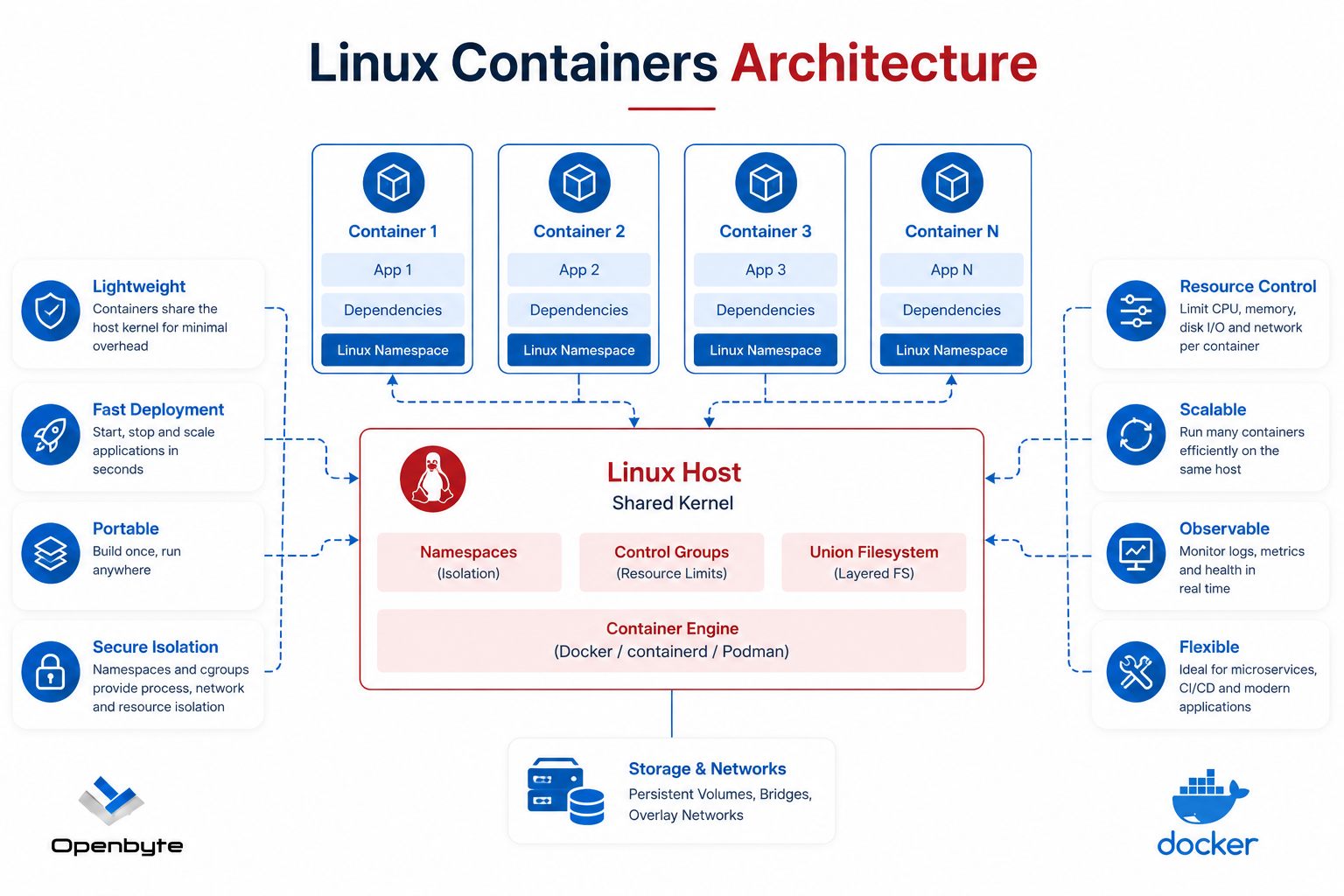
Linux Containers Architecture

Click to expand — Linux Containers Architecture

Containers vs Virtual Machines

Understanding the key differences helps you choose the right tool for the job.

Virtual machines Docker containers
Startup time Minutes Milliseconds
Size Multiple GB Lightweight (MB)
Memory use High — full OS per VM Low — shared OS kernel
Virtualisation Hardware (hypervisor) OS-level (libcontainer)
Portability Tied to hypervisor Fully portable
Guest OS support Wide variety Linux-based
Unit Virtual machine Container
Template VM template Image
Image store Catalog Registry

Management via Web Interface

We use 3rd party web-based management tools so you can deploy, monitor, and manage all your containers through a clean browser interface without using the command line. We also use tools to automatically pull and deploy updated container images when they become available.

Web UI Management

Deploy and manage stacks, containers, networks, and volumes through a visual dashboard — no CLI required.

Automatic Updates

Monitors your running containers and automatically redeploys them when a new image version is released.
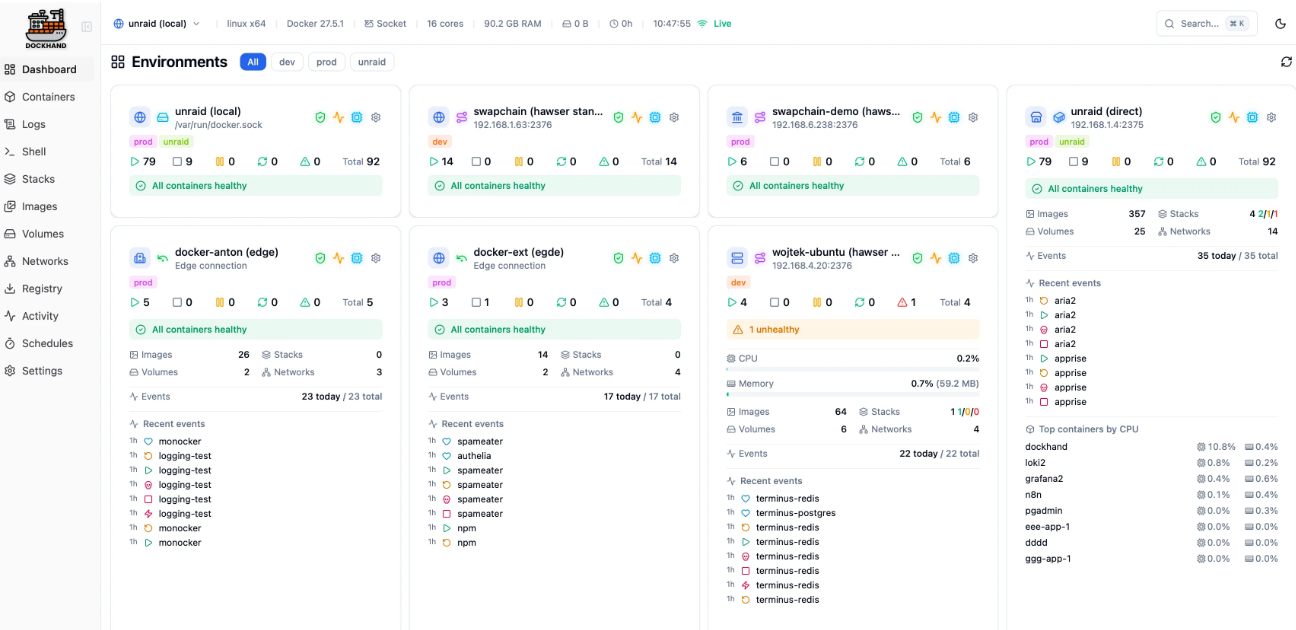
Container web UI management dashboard

Click to expand — Web-based container management interface
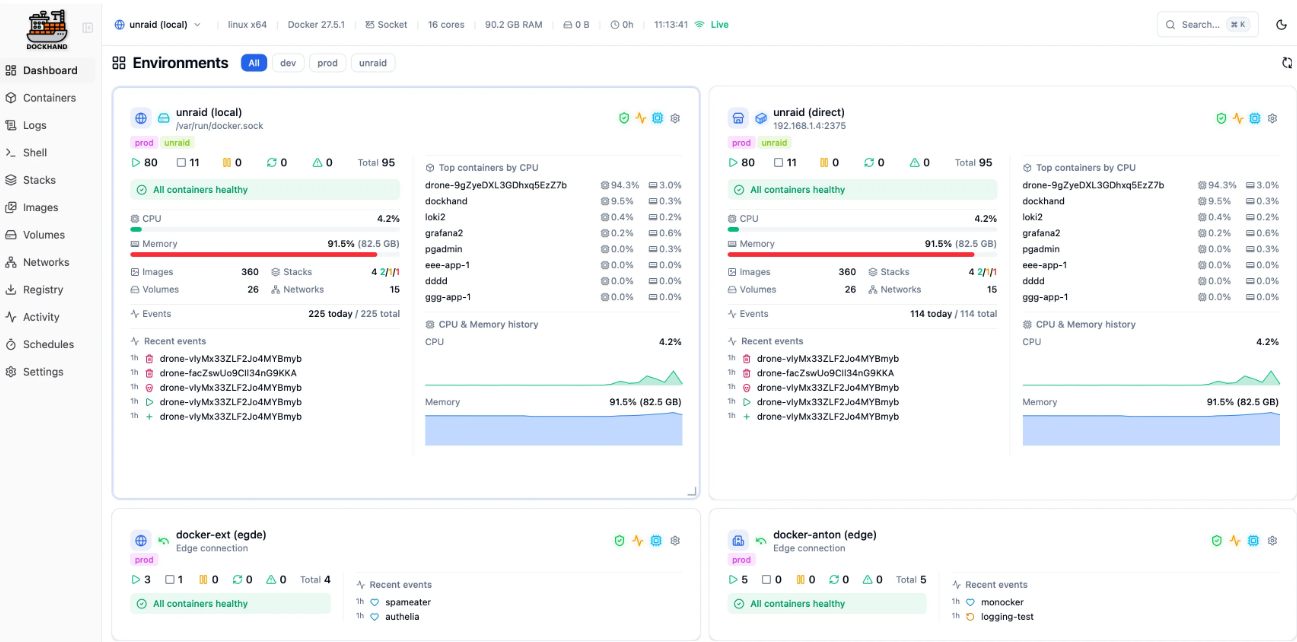
Container automatic update management

Click to expand — Automatic container image update management

Kubernetes — Advanced Orchestration

Kubernetes extends containerisation with more powerful scheduling, self-healing, and configuration management. It's the industry standard for large-scale container deployments.

Core Concepts

  • Pods – smallest deployable unit
  • Services – expose running pods
  • Deployments — declarative updates
  • ConfigMaps & Secrets
  • Namespaces for isolation
  • Persistent Volumes

Key Capabilities

  • Rolling updates & rollbacks
  • Horizontal auto-scaling
  • Self-healing & restarts
  • RBAC security policies
  • Service discovery & load balancing
  • Integrated monitoring & logging

Advanced Features

  • StatefulSets for persistent apps
  • DaemonSets across all nodes
  • Ingress HTTP/S routing
  • Helm package manager
  • Custom Resource Definitions
  • Operators for automation

Monitoring & Management

  • Native monitoring integrations
  • Resource quotas & limits
  • Network policies
  • External load balancer support
  • Pod affinity scheduling
  • Automatic bin packing

Google Cloud Platform Container Services

For cloud-hosted workloads, GCP offers a suite of managed container services suited to different scale and complexity requirements.

Cloud Run

  • Serverless containers
  • Scales to zero when idle
  • Pay-per-use billing
  • CI/CD integration
  • Security scanning

Artifact Registry

  • Centralised image store
  • Vulnerability scanning
  • Container signing
  • Geo-replication
  • Fine-grained access control

GKE

  • Managed Kubernetes
  • Autopilot mode
  • Auto-scaling & updates
  • Built-in monitoring
  • Stateful app support

Frequently Asked Questions

Common questions about Docker container solutions from South African businesses.
What is Docker and why should my business use it?
Docker is a platform for packaging applications into containers — isolated, portable units that run consistently across any environment. South African businesses use Docker to eliminate "works on my machine" problems, speed up deployments, and reduce infrastructure costs by running multiple services on a single server.
What is the difference between Docker and a virtual machine?
Virtual machines include a full OS per instance, making them heavy and slow to start. Docker containers share the host OS kernel, so they start in milliseconds and use a fraction of the RAM and storage. For most application workloads in Johannesburg and Cape Town, containers are more efficient than VMs.
Can Openbyte help migrate our existing applications to containers?
Yes. We assess your existing application stack, write Dockerfiles and Docker Compose configurations, and migrate your services to containers running on Linux servers — whether on-premise or in the cloud. We handle the full migration with minimal downtime.
Do you offer Kubernetes orchestration for larger deployments?
Yes. For businesses with more complex or high-availability requirements, we deploy and manage Kubernetes clusters — including Google Kubernetes Engine (GKE) on GCP. Kubernetes adds self-healing, auto-scaling, and rolling updates on top of Docker containers.
How do you keep containers secure and up to date?
We implement automated image update tools that monitor your running containers and redeploy them when new versions are available. We also apply container hardening — minimal base images, read-only filesystems, dropped Linux capabilities, and vulnerability scanning — keeping your South African deployments secure.
Linux Docker GCP Ubuntu Nextcloud Wazuh BareOS Zabbix Linux Docker GCP Ubuntu Nextcloud Wazuh BareOS Zabbix